01 — The lunar stage
| *Chaotic Curiosity | regolith series* |
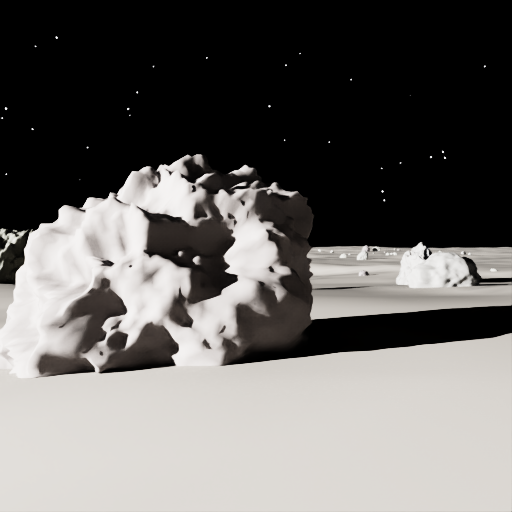
The primer explained why you need synthetic data. This chapter is where you actually build some. By the end you’ll have a procedural lunar scene — regolith ground, a field of realistic noise-displaced basalt boulders, harsh low sun, near-black sky — and your first pixel-accurate 3-class segmentation mask. The reference frames at the bottom of this page are rendered at 512 × 512 (the resolution the training dataset is generated at) and came out of that exact run.
A note on what changed. The rocks you see here are the realistic build (the second iteration). The first version of this scene used crude low-poly icospheres; chapter 06 tells the full story of why we rebuilt them as photoreal basalt — and the surprising sim-to-real cost that came with the upgrade. This chapter describes the rocks as they stand now.
The scene at a glance
The scene lives in OpenUSD (Universal Scene Description) — the file format originally developed by Pixar that NVIDIA adopted as the lingua franca of Omniverse. A USD stage is a scenegraph: a hierarchy of prims (primitive nodes) that carry geometry, materials, transforms, and arbitrary metadata. When NVIDIA Omniverse Replicator renders the stage and asks “which class is this pixel?”, the answer comes from USD Semantics — a metadata schema that lets you stamp any prim with a human-readable label. Tag the rock mesh "rock", tag the ground "regolith", tag the sky sphere "sky", and Replicator’s BasicWriter will emit a per-pixel label mask for free.
The whole scene is procedural — no external assets, no omniverse:// URI lookups, no internet. Everything is generated from numpy and authored into the stage via pxr (the Python bindings to OpenUSD). That matters: it means you can run the scene builder anywhere the Isaac Sim container runs, with no asset registry and no network dependency.
The stage hierarchy looks like this:
/World/
  Regolith          — displaced ground mesh (heightfield + craters), class "regolith"
  Rocks/
    Rock_000 … Rock_N   — noise-displaced basalt boulders, class "rock"
  Sun               — UsdLux.DistantLight, harsh, low elevation
  StarDome          — large emissive near-black sphere, class "sky"
  Stars/
    Star_000 … Star_N   — tiny emissive spheres, class "sky"
  RoverCam          — UsdGeom.Camera at rover eye height
Let’s walk each piece.
The regolith ground
The ground is a 920 m x 920 m heightfield — a regular grid of 300 x 300 cells (roughly 3 m per cell) with each vertex displaced upward or downward by a noise function. You author it as a UsdGeom.Mesh with 90,601 vertices and 90,000 quads.
The elevation profile comes from fBm (fractional Brownian motion) value noise — five octaves stacked at increasing frequencies so you get both the broad undulations of real lunar terrain and finer surface texture on top. The primary amplitude is 3.2 m at the nominal scene — enough relief to read clearly in renders, exaggerated slightly from the relatively flat lunar mare.
On top of the fBm, the builder stamps craters: parabolic bowls with raised rims, placed at random positions across the terrain. The default scene (seed 42) gets 6–10 craters of 10–38 m radius. Inside each crater radius the ground dips as a parabola; just outside, a Gaussian bump forms the rim. It’s not physically accurate to impact mechanics — it doesn’t need to be. What it needs to do is vary local horizon lines so that lighting and shadow vary realistically across frames.
Per-vertex normals are computed from the height gradient (numpy’s gradient) so the UsdPreviewSurface material shades correctly across the fBm surface. The material itself: diffuseColor = (0.22, 0.20, 0.19) — a warm gray close to the Apollo mare-regolith albedo — and roughness = 0.96, meaning nearly Lambertian scatter. Lunar regolith has almost no specular component; high roughness gets you there.
_add_semantics(regolith_prim, "regolith") # → canonical id 0
The rocks (the hazard class)
Rocks are the class that matters most for rover safety — so they get the most geometric care. The scene scatters approximately 75–115 noise-displaced basalt boulders across the terrain, with 12 guaranteed near-field boulders to ensure the hazard class is always visible close to the camera. These are not the smooth low-poly blobs of the first build; they are irregular, eroded, sub-angular rocks, and the difference is what chapter 06 is about.
The base mesh is still an icosphere (a geodesic sphere), but the subdivision level now scales with the rock’s on-screen size, via _subdiv_for_scale. A pebble a few pixels wide stays at subdivision-2 (162 vertices / 320 faces) — spending more polygons on it would be wasted. A large near-field boulder gets subdivision-4 (2,562 verts) and the biggest hero boulders subdivision-5 (10,242 verts / 20,480 faces), enough resolution that the displacement reads as fine pits and creases rather than facets. A full nominal scene runs on the order of ~0.7 M triangles.
The shape comes from multi-octave 3-D value noise displacing each vertex along its radial direction (_displace_rock). Four terms stack:
- Coarse fBm lumps — the overall blocky boulder form (4 octaves of 3-D fractional Brownian motion).
- A ridged “facet” term —
1 − |fBm|, which turns noise valleys into sharp ridges, producing the angular creases and planar fracture faces of real broken basalt rather than smooth bulges. - Medium bumps and fine grain — higher-frequency octaves that add surface texture down to the pit scale.
The noise domain is sampled anisotropically per rock (a random offset plus a per-axis stretch), so boulders come out elongated and individually distinct rather than spherical variations on one shape. Crucially, the displaced mesh is shaded with smooth per-vertex normals — face normals averaged into the shared vertices (_vertex_normals) — which is what dissolves the old visible facets into a continuous matte basalt surface.
The material is no longer a single gray. Rocks draw from a small pool of 12 dark-basalt PBR materials (_make_rock_material_pool): per-material base albedo in 0.058–0.130 (dark-to-medium basalt, deliberately darker than the 0.18–0.22 regolith), a faint warm-gray tint with per-channel jitter, and high roughness (0.85–0.97). Sharing a 12-material pool across the whole field gives tonal variety without authoring a unique shader per rock. All of these — per-rock albedo, roughness, and displacement amplitude — are domain-randomizable knobs (chapter 02).
Each rock still gets independent random scale, rotation, and XY placement. The scale is non-uniform (sx, sy, sz drawn separately, with sz biased to produce the flat-bottomed profiles typical of impact ejecta). Every rock is partially embedded in the regolith — sunk below the local terrain height, sampled by bilinear interpolation of the height grid — which prevents the “floating rock” artifact that signals a synthetic dataset immediately.
_add_semantics(prim, "rock") # → canonical id 1
Hold one fact for later: these rocks are rough, gray, and bumpy — and so, at photographic resolution, is real lunar regolith. That visual resemblance is exactly what comes back to bite the model in chapter 04.
The sun
The sun is a UsdLux.DistantLight — a directional light at infinity, producing perfectly parallel rays with hard shadows. Three parameters define its character:
Elevation 17° above the horizon. Low. The Moon has no atmosphere to scatter or soften light, and missions to the lunar south pole operate at oblique illumination angles. At 17°, every rock casts a long shadow reaching toward the camera.
Azimuth 120° — roughly behind and to the right of the camera, which looks across the terrain in the +Y direction. The sun is never in frame. Long shadows sweep from rocks across the ground toward the lens.
Intensity 14,000, angle 0.53°. The angular size matches the sun’s real apparent diameter (~0.53°), producing crisp, geometrically accurate shadow edges — no penumbra. Light color (1.0, 0.97, 0.92): warm white, because without an atmosphere there’s no Rayleigh scattering to tint it.
The sky dome
The sky is a large emissive sphere — radius 600 m, centered on the scene — that the camera sees as background in every direction. Its material is authored unlit with a near-black emissive color (0.01, 0.01, 0.016), meaning it emits that faint blue-black regardless of scene lighting. Stars are ~220 tiny emissive spheres placed on the dome’s inner surface, biased toward the hemisphere the camera faces.
Both the dome mesh and the star spheres carry the "sky" semantic label:
_add_semantics(dome_prim, "sky")       # → canonical id 2
_add_semantics(star.GetPrim(), "sky")  # → canonical id 2
The camera
/World/RoverCam is a UsdGeom.Camera placed at (0, -90, 2.0) — 2.0 m eye height (rover/lander scale), 90 m behind the origin, looking across the terrain in the +Y direction. Focal length 20 mm on a 24 mm x 24 mm square sensor gives ~62° horizontal field of view. The camera tilts slightly downward (pitch ~-0.9°) to put near ground in frame.
USD Semantics: the label infrastructure
The whole point of authoring the scene in USD, rather than rendering to a framebuffer and annotating manually, is that you can tag every prim at authoring time and get pixel-accurate labels for free. The tagging call:
from isaacsim.core.utils.semantics import add_update_semantics
add_update_semantics(prim, semantic_label="rock", type_label="class")
tells Replicator’s SDG pipeline (Synthetic Data Generation pipeline) that this prim belongs to class "rock". At render time, the BasicWriter annotator traces each rendered pixel back to the prim that produced it and emits a mask image where the pixel value is the class id.
The canonical class map for this project:
| Class | Id | What it is |
|---|---|---|
regolith |
0 | Safe ground — the traversable surface |
rock |
1 | Hazard — what the model needs to detect |
sky |
2 | Background — neither safe nor hazard |
Unlabeled or background pixels — anything Replicator couldn’t assign to a prim with a semantic label — get 255 (IGNORE_INDEX). The training loop excludes these pixels from the loss. In a correctly built scene there should be zero of them.
Reading the mask: raw ids vs. canonical ids
There’s a subtlety worth knowing before you touch the output files. When BasicWriter writes a mask with colorize_semantic_segmentation=False, it emits raw Replicator label ids — not the canonical {0, 1, 2} map above. Replicator reserves ids 0 and 1 for its internal BACKGROUND and UNLABELLED slots and then assigns scene classes dynamically in the order it encounters them. For this scene the raw mapping ends up:
0 = BACKGROUND
1 = UNLABELLED
2 = sky
3 = rock
4 = regolith
You can’t hardcode that — the numbering is an implementation detail that can change. The stable key is the class name string in the labels JSON that Replicator writes alongside every mask (semantic_segmentation_labels_*.json). The canonical_mask_from_json() function in scene/build_lunar_stage.py parses that JSON, matches class names (normalized .strip().lower()), and remaps the raw mask to the canonical {0, 1, 2, 255} values. The training pipeline, dataset loader, and metrics module all operate on canonical masks — the raw ids never appear outside this one translation step.
The reference frames
The validated nominal scene: seed 42, 512 × 512. A single large noise-displaced basalt boulder dominates the near field — rough, pitted, sub-angular, sunk into the regolith — with smaller rocks scattered toward the horizon under a near-black starfield sky.
The corresponding 3-class segmentation mask, colorized with the project’s fixed palette — tan = regolith, red = rock, blue = sky:
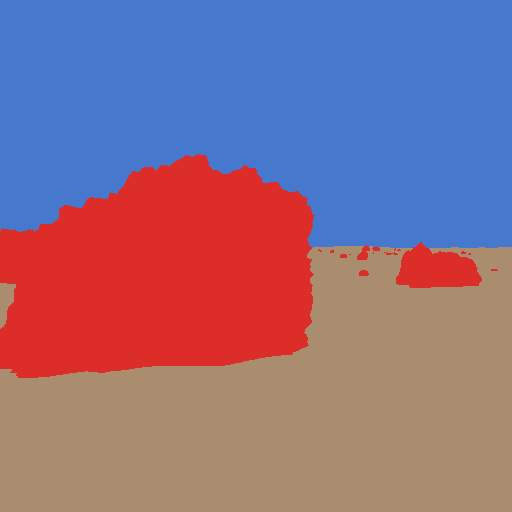
Approximate class coverage for this frame, read off the mask:
| Class | Id | Coverage |
|---|---|---|
| regolith | 0 | ≈ 37% |
| rock | 1 | ≈ 22% |
| sky | 2 | ≈ 41% |
| UNLABELED | 255 | 0% |
Rock reads at ≈ 22% here — well above the 1–8% typical of a training frame — because this reference is deliberately composed around one large near-field boulder. Zero unlabeled pixels, RGB mean 103.4 / p99 240 / max 249 — lit, not black. That’s what a valid scene looks like.
The gotchas (four real ones)
These issues came up during the actual build. Anyone working with Replicator’s SDG pipeline on Isaac Sim 6.0 will encounter them.
The singleton SDG annotator
The semantic_segmentation annotator lives once in the Replicator SDG pipeline — at /Render/PostProcess/SDGPipeline/Replicator_semantic_segmentation. Its colorize flag is global. If you attach a colorize=False writer (for the raw training mask) and a colorize=True writer (for a colorized preview) to the same render product simultaneously, the second writer silently flips the first’s flag:
Annotator ... already attached. Modifying `colorize` from `False` to `True`
The raw mask is corrupted — label ids overwritten with RGB color values. The fix: two sequential passes. Pass A: attach colorize=False writer → step → poll-drain output files → detach. Pass B: attach colorize=True writer → step → poll-drain → detach. The build_lunar_stage.py __main__ does exactly this. The poll-drain pattern (pumping simulation_app.update() while watching the output directory for PNG files) comes from Session 2: the first RTX frame on the Spark’s GB10 takes ~150 s and a bare wait_until_complete() fires before the file lands.
The sky dome occluding the sun
A UsdLux.DistantLight is at infinity. If you enclose the scene in a fully closed sphere, every shadow ray from the terrain surface hits the dome before reaching the sun — 100% shadowing, all-black scene. There are no highlights and no long shadows; only the emissive stars render.
The fix: cut a spherical cap out of the dome around the sun direction — a 34° conical hole in the sun-facing hemisphere. The builder skips any quad face whose centroid direction has a dot product with the sun direction above cos(34°). Shadow rays from terrain now escape through the hole and reach the DistantLight.
The sun is at azimuth 120° — behind the camera, which looks toward azimuth ~0°. The hole sits ~118° off the camera’s optical axis, well outside the ~44° half-diagonal frustum. The camera sees only dome, never through the hole.
The Fresnel flare fix
Even after cutting the cap, rays passing through the hole at grazing angles hit the far interior of the dome. UsdPreviewSurface uses a metallic-roughness workflow with a hardcoded dielectric F0 of ~0.04 — and at grazing angles, the Fresnel term amplifies that to a bright specular highlight. The result: a gray patch at the horizon that reads as bright sky but doesn’t match the near-black space background. Some pixels would be misclassified or look obviously synthetic.
The fix: author the sky dome material as unlit. Switching to useSpecularWorkflow=1 and setting specularColor=(0, 0, 0) zeroes all specular response. The dome renders as its emissive color — flat near-black — regardless of any light that reaches it.
The Gf.Vec3f(numpy.float32) cast
OpenUSD’s Boost.Python bindings want native Python floats, not numpy scalars. Calling Gf.Vec3f(np_float32_a, np_float32_b, np_float32_c) raises Boost.Python.ArgumentError. The fix: Gf.Vec3f(float(a), float(b), float(c)). Note the asymmetry: Vt.Vec3fArray and Vt.IntArray do accept numpy arrays directly (used for the 90,601-vertex mesh) — it’s the scalar constructors that need the explicit cast.
Reproduce
# 1. Free memory on the Spark
ssh spark "bash /home/chaotic-curiosity/regolith/scripts/free_memory.sh"

# 2. Persistent dev container with warm shader cache
ssh spark "mkdir -p /home/chaotic-curiosity/regolith_cache /home/chaotic-curiosity/regolith_scene_out \
  && chmod 777 /home/chaotic-curiosity/regolith_cache /home/chaotic-curiosity/regolith_scene_out \
  && docker run -d --name isaac-dev --entrypoint bash --gpus all --network=host \
       -e ACCEPT_EULA=Y -e PRIVACY_CONSENT=Y \
       -v /home/chaotic-curiosity/regolith:/workspace/regolith:rw \
       -v /home/chaotic-curiosity/regolith_scene_out:/workspace/out:rw \
       -v /home/chaotic-curiosity/regolith_cache:/isaac-sim/.cache:rw \
       nvcr.io/nvidia/isaac-sim:6.0.0 -lc 'sleep infinity'"

# 3. Render one validation frame (seed 42, 1024x1024)
ssh spark "docker exec isaac-dev bash -lc \
  'rm -rf /workspace/out/labelid /workspace/out/preview; \
   SMOKE_OUT=/workspace/out /isaac-sim/python.sh \
   /workspace/regolith/scene/build_lunar_stage.py --seed 42 --out /workspace/out'"

# 4. Tear down and restart co-tenants
ssh spark "docker rm -f isaac-dev; docker start open-webui ollama-compose compose-arangodb-1"
Cold first frame: ~160 s (RTX shader compile on the GB10). Warm subsequent frames: ~21 s. The persistent shader-cache volume at /isaac-sim/.cache (chmod 777) eliminates the cold-start penalty on reruns.
What you now understand
- A USD stage is a prim hierarchy; every prim can carry a USD Semantics class label that Replicator reads at render time.
- The scene is five components: a displaced fBm heightfield (regolith), a field of realistic noise-displaced basalt boulders (rocks — icosphere base, subdivision scaled by on-screen size, displaced by 3-D fBm lumps plus a ridged facet term, smoothed with per-vertex normals, shaded from a 12-material dark-basalt PBR pool), a
DistantLight(the sun), an emissive near-black dome with a spherical-cap hole (sky), and a rover-height camera. - The canonical class map is
{regolith: 0, rock: 1, sky: 2}, with 255 as the ignore index for unlabeled pixels. - Replicator writes raw label ids, not canonical ids — the labels JSON is the stable key;
canonical_mask_from_json()does the remap. - Four gotchas to carry forward: the singleton annotator (sequential passes), dome-occludes-sun (spherical cap), Fresnel flare (unlit sky material), and numpy-to-Gf scalar casting.
Continue to 02 — Domain randomization.